


If you think website maintenance is optional, think again.
An unmaintained website doesn’t just become outdated—it becomes vulnerable, slow, unreliable, and unsafe. In today’s digital-first world, that can lead to serious consequences for your business, your brand, and your revenue.
Whether you’re running a small business, an e-commerce store, or a corporate site in the Philippines or anywhere in the world, ignoring website maintenance is a risk you can’t afford.
Key Takeaways: The Real Cost of Website Neglect
Don’t have time for the full read? Here is the bottom line on why website maintenance is a non-negotiable for your business:
- Security is Not Static: An unmaintained website is a “sitting duck.” Outdated plugins and frameworks are the #1 entry point for hackers and malware.
- The “Google Blacklist” is Real: If your site is compromised, Google will flag it as “Deceptive” or “Harmful,” instantly killing your organic traffic and brand reputation.
- Maintenance is Cheaper than Repair: Emergency “hack recovery” services and lost revenue during downtime cost significantly more than a proactive monthly maintenance plan.
- Performance Impacts Profit: Regular updates keep your site fast. A slow, unmaintained site leads to higher bounce rates and lower conversion levels.
- Trust is Your Currency: In a competitive digital market (especially in growing hubs like the Philippines), a secure, functional website is the primary way to build and keep customer confidence.
Table of Contents
- What is an Unmaintained Website?
- Why Unmaintained Websites Become Security Risks
- Why Website Maintenance is Critical for Business Growth
- What Happens When a Website Gets Hacked?
- Common Cyber Threats Affecting Unmaintained Websites
- Who Is at Risk of Website Security Issues?
- The Real Cost of an Unmaintained Website
- Why Website Maintenance Is an Investment, Not an Expense
- What You Should Do to Protect Your Website
- When Should You Hire a Website Maintenance Service?
- Final Thoughts: Why Website Maintenance Is Critical for Security and Business Protection
- FAQ: Website Maintenance and Security
What is an Unmaintained Website?
An unmaintained website is a website that no longer receives regular software updates, security patches, backups, or performance checks needed to keep it secure and functioning properly. This can include outdated CMS platforms such as WordPress, old plugins and themes, unsupported code, and neglected website optimization. Over time, these issues increase the risk of cyberattacks, slow performance, website errors, and unexpected downtime. Hackers actively look for these weaknesses because they are easier to exploit.
Why Unmaintained Websites Become Security Risks
Outdated websites are one of the easiest targets for cybercriminals.
Here’s why:
- Security vulnerabilities are left unpatched
- Old plugins can contain known exploits
- Weak server configurations remain exposed
- No monitoring means attacks go unnoticed
Common result:
A website that looks normal on the surface, but is already compromised in the background.
Why Website Maintenance is Critical for Business Growth
Website maintenance is not just technical work—it’s business protection.
Related: What is Website Maintenance? Why Does Your Business Need It?
Regular updates help you:
- Prevent hacking attempts
- Improve website speed and performance
- Ensure smooth user experience
- Maintain SEO rankings
- Protect customer data
In competitive markets like the Philippines, where businesses are rapidly shifting online, an unmaintained website can quickly put you behind competitors.
What Happens When a Website Gets Hacked?
A hacked website is more than just a technical issue—it becomes a business crisis.
Google may flag your website
When your site is compromised, Google can display warnings such as:
- “This site may be hacked”
- “Deceptive site ahead”
This immediately scares visitors away and damages trust.
SEO impact
A hacked website can lead to:
- Ranking drops in Google search results
- Temporary or permanent deindexing
- Loss of organic traffic
Recovery challenges
Fixing a hacked website often involves:
- Malware removal
- Security audits
- System restoration
- Google re-evaluation requests
Recovery can take days, weeks, or even months depending on severity.
Common Cyber Threats Affecting Unmaintained Websites
An outdated website is more vulnerable to cyber threats that can compromise your data, damage your reputation, and disrupt your business. Here are some of the most common risks:
Malware Injection
Hackers can exploit outdated software to inject malicious code into your website. This malware may steal sensitive information, damage files, slow down your site, or even infect your visitors’ devices.
Related: Website Malware: Everything You Need to Know
Content Scraping
Content scraping occurs when bots or other websites copy your text, images, or other content without permission. Aside from violating your intellectual property, duplicated content can affect your search engine rankings and reduce your website’s visibility.
Spam and Phishing Attacks
Cybercriminals may use unsecured websites to send spam, display malicious advertisements, or create fake login pages that trick visitors into revealing personal or financial information. This can quickly damage your credibility and put your customers at risk.
Related: What is Cyber Phishing? Types of Phishing Attacks and How to Prevent Them
Malicious Redirects
Hackers can secretly redirect your visitors to suspicious, harmful, or unrelated websites without their knowledge. These redirects create a poor user experience, increase security risks, and can cause search engines to flag or penalize your website.
Who Is at Risk of Website Security Issues?
The simple answer is anyone with a website. Cybercriminals don’t just target large organizations—they often look for websites with outdated software, weak security measures, or neglected maintenance. However, some websites are at greater risk than others.
Small businesses
Small businesses often have limited IT resources and may not have a dedicated team to monitor website security. This can leave outdated plugins, software, and security vulnerabilities unaddressed, making them attractive targets for cyberattacks.
E-commerce websites
Online stores process sensitive customer information, including payment details, personal data, and shipping addresses. Without regular security updates and monitoring, these websites are more vulnerable to data breaches, fraud, and financial losses.
Government and educational websites
Government agencies and educational institutions often manage large amounts of confidential information and serve thousands of users. Older systems, delayed software updates, and complex digital infrastructures can make these websites appealing targets for cybercriminals.
In the Philippines, several public and private organizations have experienced cyberattacks linked to outdated systems and poor website maintenance. Regular updates, security monitoring, and timely maintenance are essential to reducing these risks and protecting both your website and its users.
The Real Cost of an Unmaintained Website
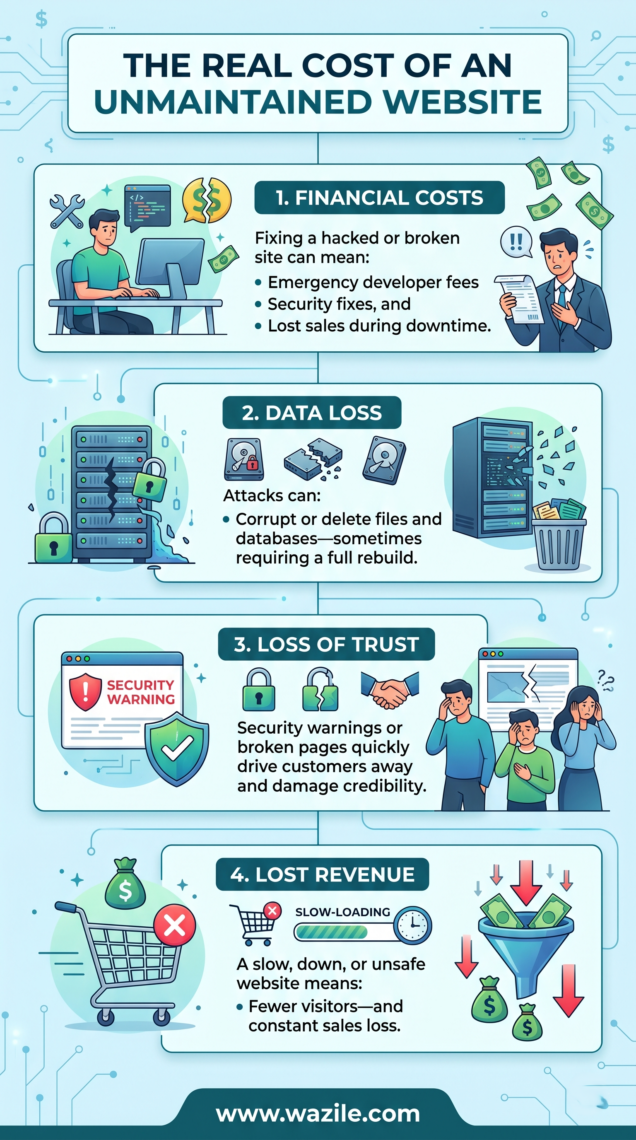
Ignoring website maintenance may seem harmless, but the hidden costs are significant.
1. Unexpected Financial Costs
A cyberattack can result in unexpected expenses, including emergency website repairs, malware removal, security audits, and lost revenue while your website is offline.
2. Data Loss and System Damage
Hackers can delete or corrupt important files, steal customer information, or damage your database, making it difficult and costly to restore your website.
3. Loss of Customer Trust
Visitors are less likely to trust a website that displays security warnings, loads suspicious content, or experiences frequent downtime, which can drive them to your competitors.
4. Loss of Revenue
When your website is slow, unavailable, or flagged as unsafe, potential customers may leave before making a purchase, submitting an inquiry, or completing a booking, resulting in lost sales and business opportunities.
Why Website Maintenance Is an Investment, Not an Expense
Website maintenance is an investment because it protects your business from costly downtime, security threats, and lost customers while keeping your website fast, secure, and reliable. Regular maintenance also helps protect your brand reputation, maintain search engine rankings, improve website performance, and support long-term business growth. Rather than waiting for problems to occur, investing in reliable website maintenance services helps you save time, reduce unexpected costs, and keep your digital presence performing at its best.
What You Should Do to Protect Your Website
Protecting your website starts with consistent maintenance. Rather than waiting for a security issue or website failure, taking preventive steps can help keep your site secure, reliable, and performing at its best.
To reduce the risk of cyber threats, make sure you:
- Update your CMS, plugins, and themes regularly to fix known vulnerabilities.
- Install security patches as soon as they become available.
- Set up automated backups so your website can be restored quickly if something goes wrong.
- Monitor your website’s uptime and performance to detect issues before they affect visitors.
- Run regular security scans to identify and remove potential threats early.
By following these website maintenance best practices, you can minimize security risks, improve your website’s performance, and ensure a safer experience for your visitors.
Related: What is a CMS / Content Management System? A Useful Guide
How often should you maintain your website?
Ideally:
- Monthly updates for content and plugins
- Quarterly security audits
- Real-time monitoring for active websites
When Should You Hire a Website Maintenance Service?
You should hire a website maintenance service as soon as your website starts showing signs of poor performance, outdated software, or security risks—or before these issues affect your business. If your site loads slowly, crashes frequently, hasn’t been updated in a while, relies on online leads or sales, or handles customer data and transactions, professional maintenance can keep it secure, up to date, optimized for performance, and running smoothly.
Final Thoughts: Why Website Maintenance Is Critical for Security and Business Protection
Website maintenance isn’t just a technical task—it’s a core part of keeping your business safe and competitive online. An unmaintained website becomes vulnerable to cyberattacks, performance issues, and data loss, all of which can directly impact your credibility and revenue.
Regular updates, security checks, and performance monitoring help protect your website from threats while ensuring it stays fast, reliable, and trustworthy for your users. In a digital landscape where risks evolve constantly, proactive maintenance is the simplest way to avoid costly problems later on.
At the end of the day, maintaining your website is not an expense—it’s protection for your brand, your customers, and your business growth.
FAQ: Website Maintenance and Security
What happens if a website is not maintained?
An unmaintained website becomes vulnerable to hacking, malware, and performance issues. It may also lose search rankings and customer trust over time.
How often should website maintenance be done?
Website maintenance should be done monthly for updates and security checks, with quarterly audits for performance and deeper technical reviews.
Can an unmaintained website get hacked easily?
Yes. Outdated plugins, software, and security systems make websites easier targets for hackers and automated attacks.
What does Google do if a website is hacked?
Google may flag the website as “Deceptive” or “Hacked,” warning users before they enter and reducing visibility in search results.
Is website maintenance necessary for small businesses?
Yes. Small business websites are often more at risk because they usually have weaker security systems compared to larger companies.
Need help keeping your website secure and updated? Get our website maintenance services in the Philippines for business websites today. Contact us to get started or request a free quote.
Last Updated: May 2026
First Published: March 16, 2018